


imo video calls and chat HD
3.836.92K Reviews
App Specs
- Version
- 9.8.000000011435
- Updated On
- License
- Free
- Downloads
- 10,000,000+
- Developer
- Baby Penguin
- Categories
- Communication
- Platform
- Android, iOS
Screenshots
 Analysis by AppCompare
Communication apps can feel simple until a call fails at the exact moment you need it. In my experience, imo video calls and chat HD is most useful when the people you want to reach are already comfortable using it. It brings messaging and video calling together without asking you to learn a complicated set of tools, though getting a smooth first call still depends on a few practical checks.
Setting Up and Getting Started
First things first, downloading and setting up imo video calls and chat HD is a breeze. The app is available on both Android and iOS, and it didn’t take more than a couple of minutes to get it up and running on my phone. Once installed, I found the user interface to be pretty intuitive. It’s straightforward, with no unnecessary clutter. You just sign up using your phone number, and voilà, you're in.
Where People Can Get Stuck
The quick sign-up flow is convenient, but it also means the phone number is central to getting started. I’d have the number I intend to use available and check it carefully before moving through registration. If a confirmation step does not arrive promptly, repeatedly restarting the process is unlikely to help; first check that the number is correct, that the phone can receive messages or calls, and that the connection is working.
Another common point of friction is expecting a call to work simply because the app has opened. Video calling depends on a usable internet connection at both ends, and a weak or changing connection can affect what either person sees and hears. Before an important conversation, I’d send a quick message to the other person and agree on a time. That small step helps distinguish a connection problem from a missed call or a contact who is not ready to answer.
It also helps to set expectations with family members who are less familiar with communication apps. Ask them to install the same app, finish signing in, and try a short call before relying on it for an appointment or family event. A little preparation is more useful than trying to explain the setup while one person is waiting on the screen.
Features That Stand Out
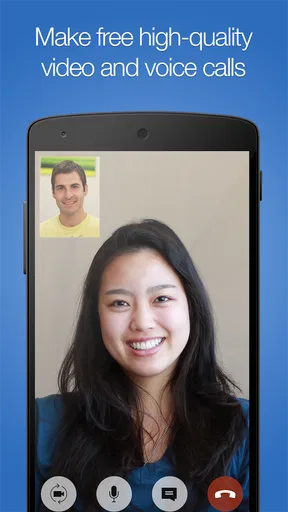
One of the key features that caught my eye was the app's capability for high-definition video calls. Whether I was catching up with my friends or having a quick chat with family, the video quality was surprisingly good. The app performed well even with a less-than-stellar internet connection, which is a huge plus in my book.
That said, I wouldn’t treat a good call on a weak connection as a guarantee that every call will look the same. Video uses more of the connection than a text exchange, and conditions can change while you are talking. If a picture becomes choppy, I’d move closer to a reliable Wi-Fi connection if one is available, pause other bandwidth-heavy activity on the same network, or switch to audio or text until the connection settles.
Worth Reading Before You Choose

EA SPORTS FC Mobile 26 Is a Bigger Football Game, but It Takes Time

Flipboard Shows What News Apps Must Do Beyond the Feed

Switching to Android Auto Means Rethinking Your Driving Routine

Google Calendar Makes a Crowded Week Easier to Manage

Ludo King Makes the Most of the Minutes Between Plans

Baby Panda World Brings Quick Play to Modern Phones, but Its Game Library Feels Busy
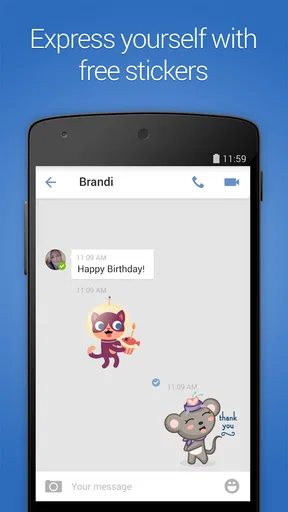
Another neat feature is its support for group video calls. You can chat with multiple people at once, which makes it perfect for virtual family gatherings or team meetings. And let me not forget to mention the fun stickers and emojis that add a little extra flair to our conversations. They’ve got a decent collection, so there’s no shortage of ways to express yourself.
Making Group Calls Work in Real Life
Group video calls are most successful when someone takes a little responsibility for keeping the conversation manageable. For a family catch-up, I’d choose a time that works across everyone’s schedules, tell participants when to join, and start with a quick check that each person can hear and be heard. This is especially useful when a relative is joining from a busy room or using a phone they do not use for calls often.
There is a trade-off: bringing several people together is convenient, but it can be harder to follow than a one-to-one conversation. People may speak at once, and someone with a poor connection can miss parts of the discussion. For a casual birthday hello or a quick family update, that is usually manageable. For a detailed work discussion where people need to share files, organize tasks, or keep a formal record, I would choose a meeting-focused service instead.
Stickers and emojis add personality to everyday messages, but I see them as a small extra rather than a reason to choose a communication app. If you are coordinating plans, put the important details in plain text too: a time, an address, or what someone needs to bring is easier to find later than a string of reactions. That simple habit makes the chat more useful without taking away its casual feel.
Small Setup Checks Before an Important Call
Before relying on imo for a call you cannot easily reschedule, I’d check a few basics: confirm that you are signed in, make sure the other person is expecting the call, and test the connection with a short message or call beforehand. If the picture or sound is poor, try moving to a spot with a steadier signal and close other apps that may be using the connection. These are general troubleshooting steps, not a promise that every problem can be fixed from the phone.
It is also worth checking the phone’s own settings if the app cannot use a feature you expect. A device-level restriction or a muted volume setting can look like an app problem. I would check the relevant settings on the phone and then try again, rather than reinstalling immediately. Reinstalling can create extra sign-in work, so I’d save it for a situation where simpler checks have not helped.
Recovering When a Call Goes Wrong
If a call drops, I would first send a message to agree whether to reconnect or continue by text. That avoids repeated calling while the other person is trying to restore their connection. If only one participant is having trouble, ask them to check their network and restart the call when ready; if both sides are struggling, wait briefly or move to a more stable connection before trying again.
When sound is the problem but video appears normal, check the phone’s volume and whether the conversation is being heard through the intended audio output. When the other person cannot hear you, check that the phone is not muted and that nothing is obstructing the microphone. These simple checks are often quicker than assuming the app itself has failed.
If the app becomes unresponsive, closing and reopening it is a reasonable first step. I’d also check whether the phone has a stable connection and enough room to run normally before making larger changes. Keeping the app updated can help avoid problems addressed in newer releases; the current version is 9.8.000000011435, and it supports Android 5.0 or later. On older or heavily loaded phones, the experience may still depend on the device as much as on the app.
When the App Is Not the Cause
A failed call does not always point to a flaw in imo. The other person may have a weak signal, the phone may be silenced, or they may simply be unavailable. I try a short message before repeating the call, because it can quickly clarify whether the person is ready and whether the problem is limited to video.
For a home connection that falters, moving closer to the router or trying another reliable network can be more useful than changing app settings. On mobile data, coverage can vary from one room or street to another. If a call matters, I would not wait until the last minute to discover that the place I plan to use has poor reception.
Battery-saving settings and other phone restrictions can also affect how an app behaves in the background. If messages seem delayed, check the phone’s general battery and notification settings rather than assuming the contact has ignored you. The exact controls differ between devices, so I’d make changes carefully and test afterward instead of turning off broad protections without a reason.
How Does It Compare?
Now, you might be wondering how imo stacks up against other popular apps out there. In terms of quality and ease of use, I'd say it holds its own. While it may not have the extensive features of some larger apps, it does what it promises exceptionally well: providing a solid platform for video calls and chatting.
Compared with a messaging app that is already used by nearly everyone in your circle, imo’s biggest practical question is whether your intended contacts will join you there. A familiar alternative is often easier if the whole family already uses it, because there is no need to persuade everyone to install another app. On the other hand, if your relatives already use imo, its direct combination of chat and calls can be a straightforward way to keep in touch without turning a simple conversation into a formal online meeting.
I would not choose it as a replacement for every communication tool. People who need elaborate meeting controls, workplace collaboration, or a specialized privacy setup should compare apps built around those priorities. For everyday personal conversations, though, a lighter, approachable option can be preferable to a service full of controls most of the group will never use.
One thing to note is that imo doesn't offer end-to-end encryption. This might be a deal-breaker for those who prioritize privacy above all. However, for everyday use, it covers the basic security measures needed for casual conversations.
For that reason, I would keep sensitive discussions on a service whose privacy protections meet my needs, rather than assuming that every video-call app provides the same level of confidentiality. The choice depends on what you plan to discuss, not just on whether the call is convenient. For casual catch-ups, the simpler experience may be enough; for private or confidential matters, I would make privacy the deciding factor.
Who Is Likely to Appreciate It
imo is a good fit for people who want a simple way to keep up with friends and family through messages and video calls, especially when their circle is already using it. Its group calling suits informal gatherings, while one-to-one calls work well for a quick check-in with someone who lives far away. The app is free to download, though it includes in-app purchases ranging from $0.99 to $199.99 per item, so I would review any purchase prompt rather than assume every optional item is included at no cost.
Its audience is broad, but the content rating is Teen, so families should take that into account when deciding whether it is appropriate for a younger user. I would also think about how comfortable that person is with phone-number-based sign-up and general online communication before recommending it. A parent or guardian should make that decision in light of the child’s age and needs.
People who rarely make video calls, do not want another app, or need advanced meeting and privacy controls may be happier with a different option. The same goes for someone whose contacts are committed to another service: an app is only useful for calling if the people you need can and will use it. The developer is Baby Penguin, and the app has a 3.8 average from around 132,000 ratings, with more than 10 million installs. Those figures suggest a substantial user base, but they cannot tell you whether your particular family or friends will find it convenient.
A Realistic Everyday Test
Imagine a relative wants to show you something at home while you are away. You can arrange a quick video call, see whether the connection is clear, and switch to a message if either of you is in a noisy place or the video starts breaking up. If several relatives want to join, a group call turns the exchange into a shared catch-up. The practical advantage is having both types of conversation in one place; the practical limitation is that everyone needs to be set up and connected at the right time.
For a first call with someone who is not confident using apps, I would keep the plan simple: ask them to install and register in advance, agree on a time, and have them try a short test call while you are both free. If that does not work, you still have time to troubleshoot without the pressure of an appointment or celebration. Once the basic routine is familiar, later calls are less likely to be interrupted by setup questions.
Final Thoughts
In conclusion, if you’re looking for a no-frills, reliable app for video chatting, imo video calls and chat HD is definitely worth checking out. It's perfect for those who need a straightforward app that just works, without getting bogged down by too many bells and whistles.
Whether you're catching up with friends or hosting a virtual party, this app makes it easy and enjoyable. So go ahead and give it a try. You might just find it becoming your go-to app for video calls!
My recommendation is to try it first with one person you already know, then decide whether the call quality and the people you want to reach make it worth keeping. That gives you a fair sense of how it behaves on your own phone and connection, without depending on a high-pressure group call as your first test. If your needs are casual and your circle is willing to use it, imo can be a useful everyday choice; if privacy controls, meeting tools, or universal reach matter more, I would choose an alternative designed around those needs.
Pros
- High-quality video calls even on low bandwidth.
- User-friendly interface that's easy to navigate.
- Supports group video calls for up to 20 people.
- End-to-end encryption for secure messaging.
- Lightweight app that doesn’t drain battery.
Cons
- Limited customization options for chat themes.
- Occasional connection drops in group calls.
- Ads can be intrusive during use.
- No desktop version available for macOS.
- Some features require in-app purchases.
FAQs for imo video calls and chat HD
What features does imo video calls and chat HD offer?
imo video calls and chat HD provides high-quality video and voice calls, instant messaging, and group chat capabilities. It supports sending multimedia files such as photos, videos, and documents. The app also offers fun stickers and emojis to enhance conversations. It's compatible with both Android and iOS devices, ensuring seamless connectivity across platforms.
Is imo video calls and chat HD free to use?
Yes, imo video calls and chat HD is free to download and use. It provides free video and voice calls over the internet, using your device’s data connection or Wi-Fi. However, be aware that standard data charges may apply, depending on your carrier or internet service provider.
How secure is my data on imo video calls and chat HD?
imo takes user privacy seriously and employs encryption to protect your calls and messages. However, it’s always good to review the app’s privacy policy and terms of service to understand how your data is handled. Regular updates are provided to enhance security and introduce new features.
Can I use imo video calls and chat HD on multiple devices?
Yes, imo video calls and chat HD can be used on multiple devices. Simply log in with your account credentials on each device to sync your chats and contacts. This feature is particularly useful for users who switch between devices, such as a smartphone and a tablet.
What are the system requirements for installing imo video calls and chat HD?
imo video calls and chat HD requires Android 4.0 or later, and iOS 9.0 or later, making it accessible on a wide range of devices. Ensure your device has a stable internet connection for optimal performance. Regular updates are released to improve functionality and compatibility with newer operating systems.


